BetPro App APK: What Is It? How to Use It? Are the Screenshots Real?
Contents
- Key takeaways
- What Is the BetPro App APK?
- Is the BetPro App a Wallet or Betting App?
- Who Is the BetPro App Built For?
- Are BetPro App Screenshots Real?
- What do the BetPro App Screenshots Show?
- What should I look for to determine if a screenshot is fabricated?
- How Can One Download the BetPro APK for Android?
- Is the BetPro APK Safe to Download?
- How Do You Use the BetPro App?
- How Does the Home Screen Work?
- How Do You Make a Deposit?
- How Do You Withdraw Money?
- What Does the History Screen Show?
- What can you change on the profile screen?
- Is the BetPro App Legal in Pakistan?
- What are the most common BetPro App problems?
- Conclusion
- FAQs
- 1. What is the BetPro app APK?
- 2. Can I place bets inside the BetPro app?
- 3. Why does the Deposit screen ask for a payment screenshot?
- 4. How can I tell if a BetPro APK file is safe?
- 5. Is using BetPro legal in Pakistan?
Last Updated:
Short answer: The BetPro app APK is the installer for the BetPro Android mobile wallet in Pakistan. The wallet allows users to deposit and withdraw Pakistani Rupees (PKR) through Easypaisa, JazzCash and bank transfers. It also allows users to view their transaction history and manage their profiles. The wallet doesn’t allow users to place bets. Users visit the BetPro website to place their bets.
Key takeaways
- The app contains five screens: Home, Deposit, Withdraw, History and Profile.
- Screenshots in this guide are captured directly. Some info has been obfuscated and/or annotated in red.
- You must send the payment first, and then post proof of payment on the Deposit screen.
- You can download the app from the official site only.
- The Prevention of Gambling Act, 1977 of Pakistan bans gambling, and so users must ascertain the legal status before using any online betting service.
“BetPro app APK” brings up the same page repeated multiple times with different titles. Stock phrases about “seamless experience” and a download button. Almost none describe the inner workings of the app, which is strange, since the inner workings is what I need to know about. I went through five screens and documented this from what I saw. I’ll give a straightforward description of the app, how to install it and how each screen works. No screenshots should be assumed to be proof of money.
What Is the BetPro App APK?
An APK is a file that contains the installer for an app for the Android platform. The BetPro APK contains a wallet and account manager for users of the BetPro platform. Betting-related apps often times are not available on the Google Play Store, so they are distributed via file systems instead.
People search “BetPro APK” to find the installer because it is often not available on the store. That changes the risk. An app on the store has been at least taken a glance at by a person, and an app file from a random link has not. Two different installer files for the same app can look identical in your Downloads folder, and one can be legit while the other can be altered by someone with bad intent. In my opinion, the source of the file changes the risk the most, and I’ll cover that most of this guide. The app is small, simple and consists of five main screens with nothing behind menus.
Is the BetPro App a Wallet or Betting App?
The BetPro app is a wallet. It manages money and account details and the actual betting takes place on the BetPro website.
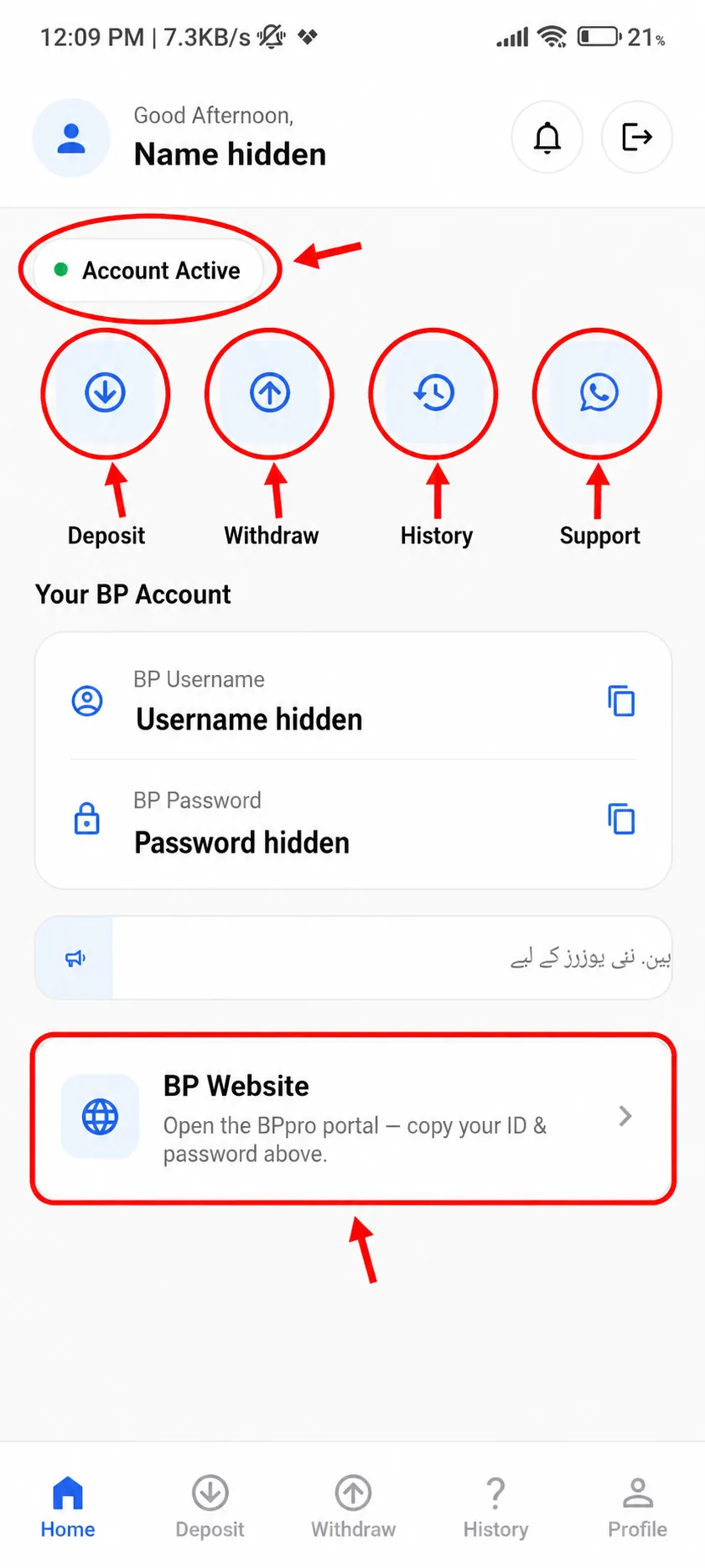
The interface is not what most people expect when opening a betting app. People expect to see odds and a bet slip with a list of cricket matches. None of that is seen. Listings found on third party websites state the app is a Free Android wallet for sports-betting funds for deposits, withdrawals, and transaction history. The screens on the app agree; dashboard, deposit, withdrawal, history, profile. There is a card on the home screen that says ‘BP Website’ and says to copy your ID and password to the website and then to login. It’s basically like a ticket counter at a stadium. Betting takes place at that counter but the event is someplace else. You download this app to bet but quickly realize that the feature to take a bet is not in this app and never was intended to be.
Who Is the BetPro App Built For?
The people of Pakistan who have a BetPro style exchange account, and want an easier way to cash out and fund their account with PKR, in a faster and convenient way.
All figures in the app are in PKR. Payment methods include Easypaisa, JazzCash and Bank Transfer. The app caters to the most common methods of payment in Pakistan. Like other similar apps, there is an announcement bar on the home screen to make an introduction to the app in Urdu, but it is cut short in the screenshot.
In BetPro, the interface itself says that this is for people who want to decrease the number of clicks between their wallet app and betting app. Judging by the interface, BetPro is not made for an international audience.
Are BetPro App Screenshots Real?
The BetPro app screenshots are real. Betting apps can’t be published on the google play store. As such, these app screenshots were captured on an android phone, personal information was changed to “hidden” info and red boxes and numbers were overlaid on the screenshots later.
The only thing I can do to prove the capture process is to show you the actual app, which is not possible for me to do. The best you can do is to download the app from the BetPro website and see the app for yourself. If you see a significant deviation between the app and the website, be wary of sending them money.
The comparison you do with BetPro is worth more than anything any article published can do to give you assurance.
What do the BetPro App Screenshots Show?
The screenshots show five different screens, the home screen, deposit screen, withdraw screen, history screen, and profile screen.
Home: Shows your dashboard and provides shortcuts to your account
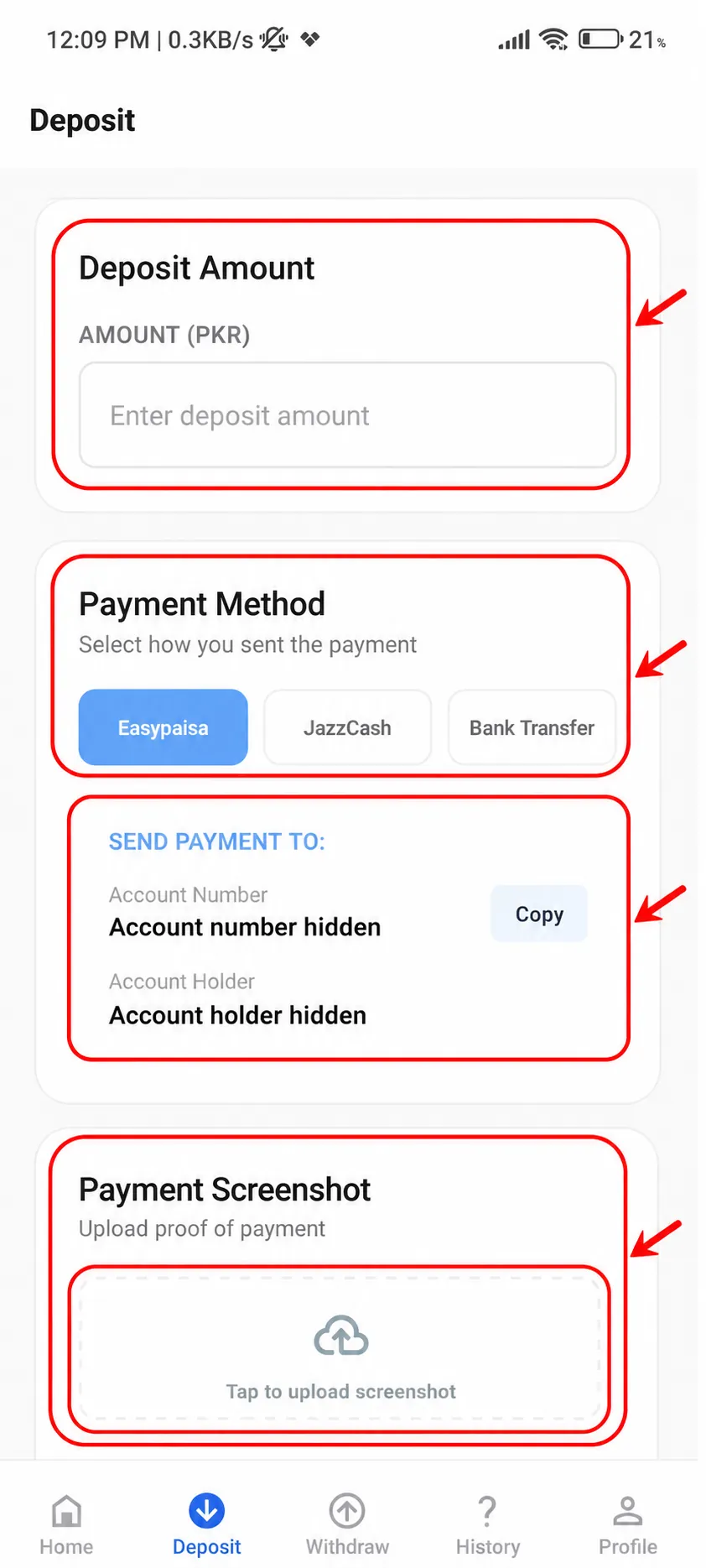
Deposit: Allows you to enter the amount you sent to your account
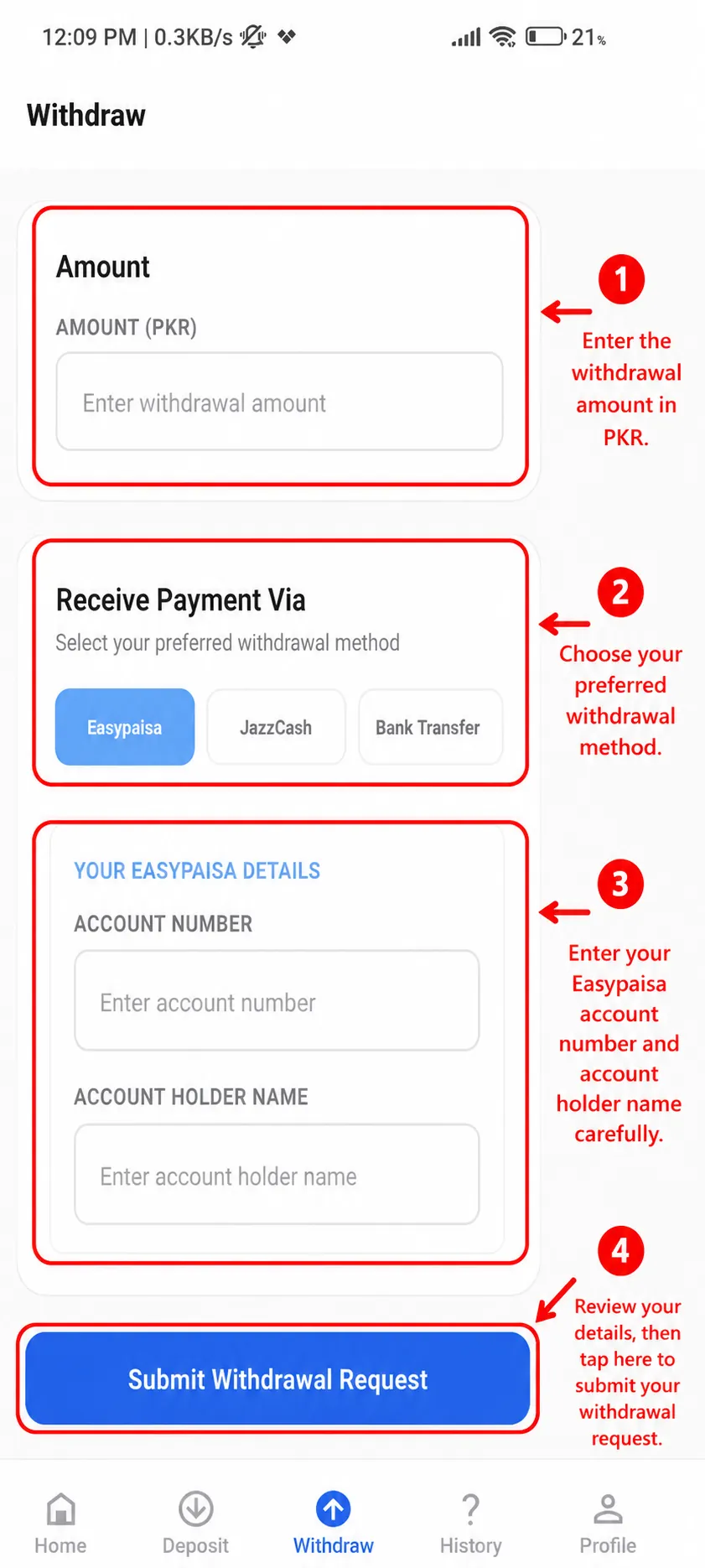
Withdraw: Allows you to enter the amount you want to withdraw
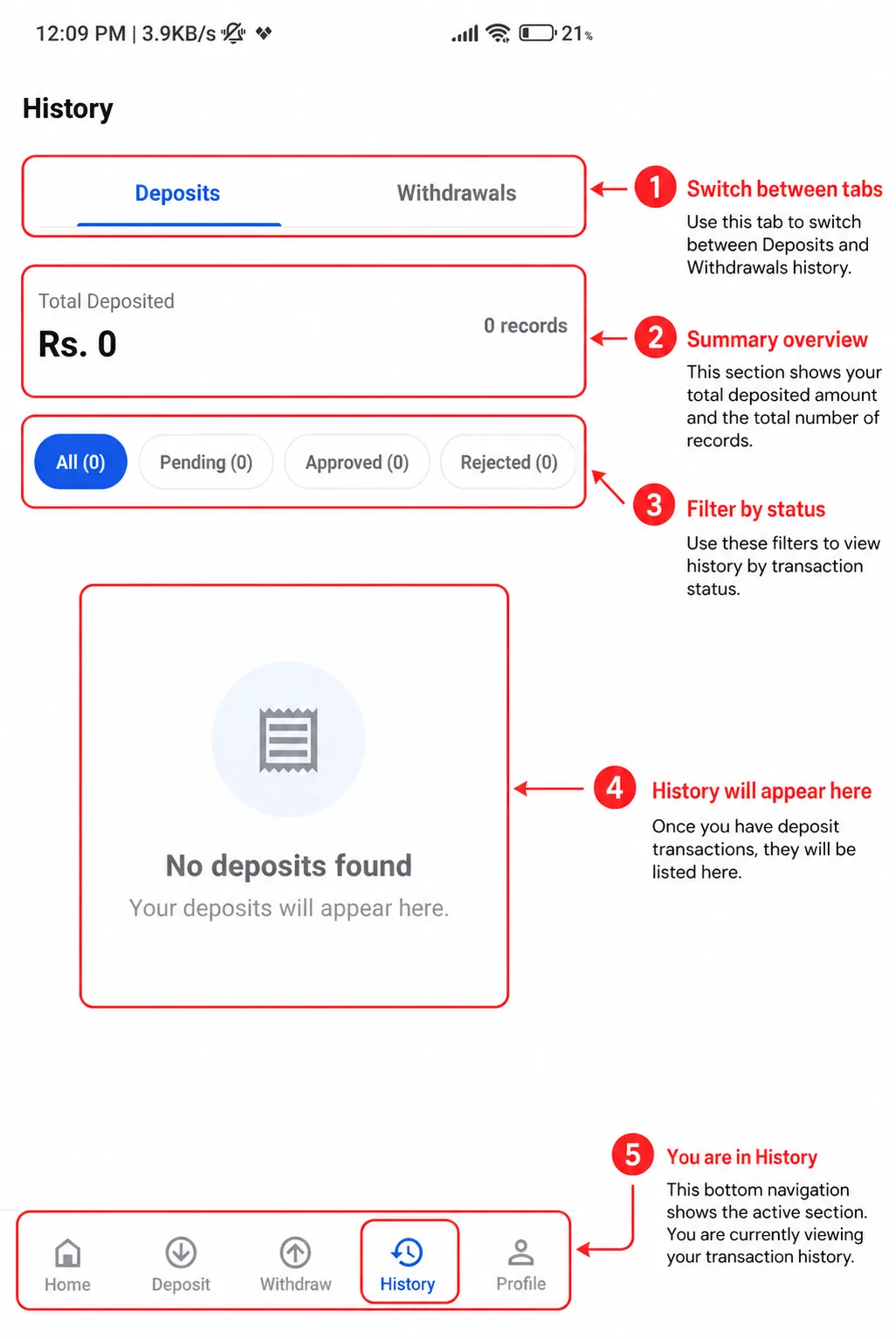
History: Allows you to track your previous requests
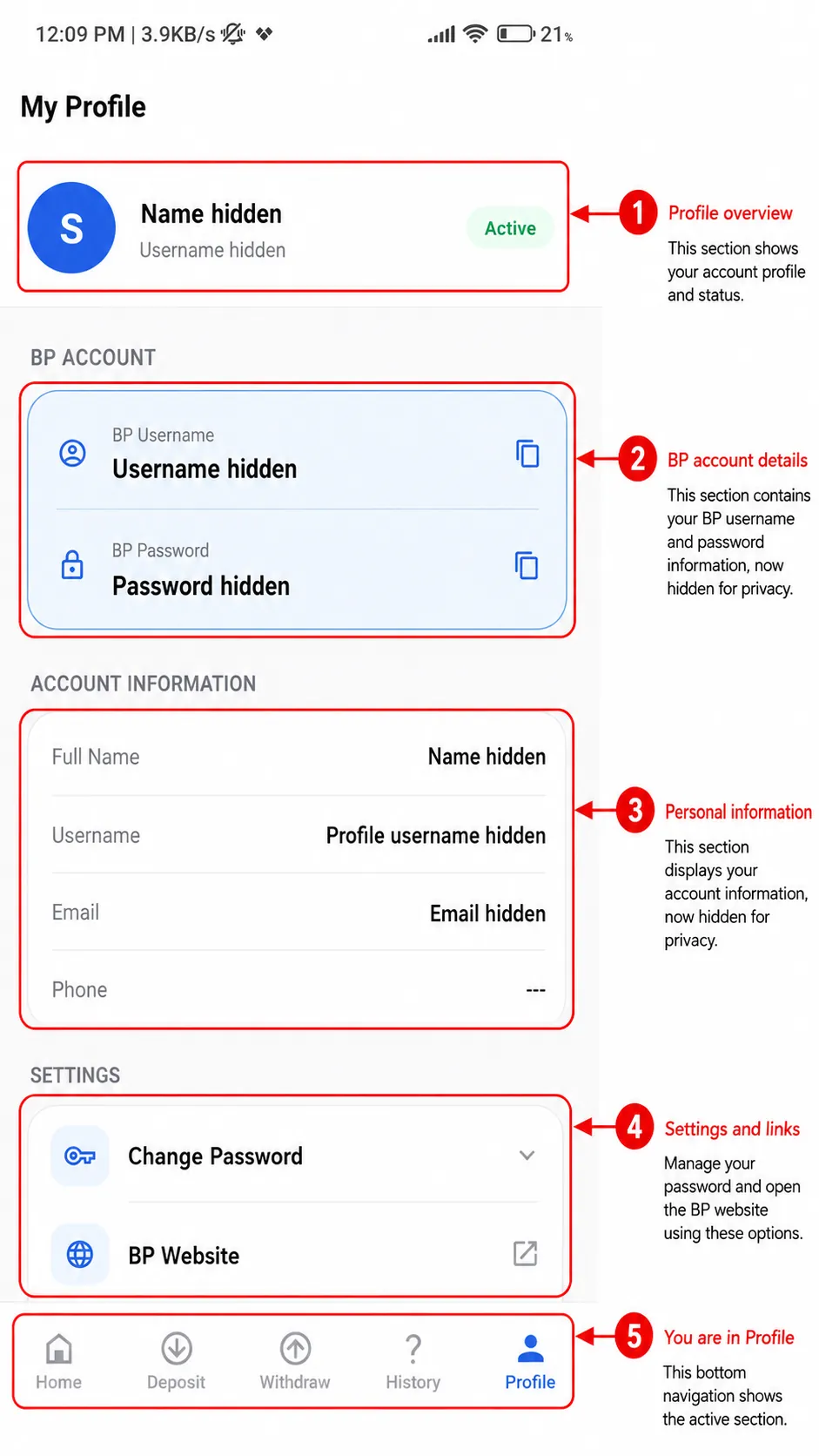
Profile: Allows you to modify your account information
Small details such as the battery level and time give the impression that the photos are from the same session. The history page shows no transactions which is to be expected with a new account. A set of fabricated screenshots would likely show positive balances because that is the entire point of faking such screenshots.
What should I look for to determine if a screenshot is fabricated?
Short answer: Zoom in and look for bad fonts and spacing, and remember a screenshot does not prove funds have been moved.
Fakes exist and cause real losses. Pakistan’s securities regulator has reported that fraudulent apps create fake dashboards showing balances and profits to convince users that there is actual activity occurring. In the betting world, a fraud signal is usually a photo of a large balance or a “withdrawal successful” message, with the agent’s WhatsApp number posted beside it. Often the photos are edited, and the digit labels next to the balances do not line up with the edges of the labels. People often ask what the images actually prove. A screenshot of an approved withdrawal shows a computer screen. It does not prove the cash has been transferred to a user’s bank account. To learn where things are on the interface, users should not use screenshots to conclude that a user has won or that a platform has made a payout.
How Can One Download the BetPro APK for Android?
The steps to download the app are similar to the steps to download any other apk for Android. Basically, you go to the source site, download the file, allow the install, open the file, and turn “unknown sources” back off.
- Tap the BetPro APK download button and wait for it to finish downloading.
- Open the APK and allow installs from that app when Android asks.
- Tap Install, and then open the app to log in.
- Go back and turn off the allow from unknown sources permission.
The bottom bar shows Home, Deposit, Withdraw, History and Profile.
What if the app crashes and won’t open? Uninstall the app from your device, then delete the BetPro APK file. Install the file again and the app should be good to go.
Is the BetPro APK Safe to Download?
If the file is from the official operator site it should be safe. Other sites put your personal info at risk.
Think of this file as software that will live next to your banking apps. The same guidance warns that downloads from third-party sources risk malware and fake applications. Independent scanners say similar things. One security review of a Pakistani APK directory noted that files on such sites can be modified and/or contain malicious codes. A few simple checks can be performed. Take your time to read the URL to the website address. Check the application permissions and be suspicious if the wallet requests access to contacts, call log and/or SMS. Keep Google Play Protect on. If someone is direct and insistent about installing the application via a chat link, that should raise a red flag, as a real operator won’t care if you wait five minutes.
How Do You Use the BetPro App?
The process is straightforward: Deposit to fund your account, play on the website, Withdraw to request a payout and view your account history and transaction history.
The application is made up of just a couple screens and follows just one loop. The bottom bar of the application is used to highlight the current tab that is being viewed. The screens and the order in which you would view them are listed below.
How Does the Home Screen Work?
Home is the dashboard. The top section shows your name and greeting, has a bell for notifications, and has a button to log out. Underneath, a green dot and “Account Active” lets you know your account isn’t suspended. Next, are four round buttons for deposit, withdraw, history and support. Support has a WhatsApp style icon. Your BP Account Card shows your BP username and password and has a copy button next to each. You must paste these into the BP website along with the support button to be taken to the website. The support button is for retrieval of lost/forgotten password. A small habit, copy your BP password and username only when you’re going to log in, and clear your clipboard after, as other apps can sometimes read it. Anyone that has access to your phone can access your BP Account. Keep your phone away from people.
How Do You Make a Deposit?
There are four parts to making a deposit. The first part is typing the amount in PKR. The second part is choosing between Easypaisa, JazzCash, and bank transfer. In the third part, a “Send Payment To” panel is displayed, which shows the receiving account number and account holder name with a copy button. Then, a picture of your payment is to be uploaded. The fourth part is selecting how you sent the payment. This is where you send the payment using your own wallet app, and then come back to report it. You should slow down at the account details. If a chat agent provides you with account details that do not match with the account details on the “Send Payment To” panel, then stop and ask the agent to clarify before sending anything. Swapped account details are an old trick in the industry, and transfers are almost impossible to reverse. Thirty seconds of comparing digits is nothing next to chasing a lost payment.
How Do You Withdraw Money?
Filling out the Withdraw form is straightforward. Enter the amount in PKR, select a method, enter your account number and holder name, and click “Submit Withdrawal Request.” There is a reason the app tells you to enter the details with care; one small error will send the money to the wrong person or, worse, leave the money stuck until the mismatch is fixed. Make sure you enter the name exactly the way it is on your bank or wallet. The payment network and the operator crosscheck names, so if there’s a mismatch, you won’t be getting your money. Don’t expect your request to be processed immediately. You’ll see your request in the queue and have to contact support if it takes too long. Finally, don’t send multiple requests, as it only makes things harder and slower for everyone.
What Does the History Screen Show?
Most users don’t look at this screen until they can’t find a payment. It’s the headquarters of all deposits and withdrawals. There are tabs for each. A summary card shows the total of all deposits, as well as the total count, and in a new account reads “Rs. 0” and “0 Records”. There are filters for all, pending, approved, and rejected, each showing a count. If there are no deposits, it says “No deposits found”. If you’re waiting on a transfer, this is the first place you should look. Transfers can be uncertain. If you’re asked to provide proof of a transfer, don’t take a picture of the proof and send it to them. They may say they can’t see it. It could be blurry. It could even say “Transfer Failed” on the proof. Don’t send money unless you are 100% certain it is going to the right person. Keep your transaction IDs outside of the app.
What can you change on the profile screen?
Your Profile brings together your account info in one place. The first card has a blue circle with your initial, your name, username and the tag “Active.” “BP Account” has your username and password again with copy icons. Your account info and settings are under “Account Information.” Settings and account info include your full name, username, email, phone, and any personal or address info you provided. Contact Support to remove personal info if you no longer need it. You can also change your profile pic and cover pic here. You can change your wallet settings to your preferred currency. Tap “Settings” and then “Change Password” to change your password, especially if an agent set up your account. Make your password something long and different from your email and wallet passwords. Check your profile before you log out on a shared phone to make sure your account info can’t be seen.
Is the BetPro App Legal in Pakistan?
Gambling is illegal in Pakistan and the authorities are known to be blocking gambling apps. How the law impacts users of offshore gambling sites is unclear so it’s best to consult a lawyer before using a gambling app.
Pakistan’s Prevention of Gambling Act, 1977, outlaws gambling, and provides for imprisonment and/or a fine. The law was enacted prior to the age of smartphones, and its jurisdiction over offshore gambling websites is obscure, as such websites lean on the loopholes of the law. In the meantime, the enforcement of the law has not remained static. For example, Pakistan’s Cyber Crime Agency blocked 46 mobile apps as part of a wide-ranging crackdown on illegal online gambling, unlawful trading and violation of data privacy. I cannot confirm or deny whether any particular app on your phone is blocked, as such lists are dynamic, and you need to refer to the latest notices of the NCCIA and the PTA. While a debate is ongoing about the merits of such legislation, from a public interest perspective, I am of the view that a strict liability approach would be prudent, and people should exercise caution when using betting apps, as one such app is designed to ultimately eat up your money. I am not a lawyer, therefore, I encourage you to consult your own lawyer before doing anything which may contravene the law.
What are the most common BetPro App problems?
Interrupted downloads, blurry deposit proof and account name mismatch are the most common problems.
A failed install usually happens because the download was interrupted or your phone is blocking the source. In either case, delete the file and fetch it again on a stable connection. A blank dashboard clears up after you log out and back in. A deposit stuck on pending is usually a blurry screenshot of an amount that doesn’t correspond to your transfer. In this case, you should upload a clear image showing the transaction ID, date, amount and recipient. A withdrawn request that is pending usually means that the name on the withdrawal request doesn’t match your registered name. If the copy buttons do not work, hold down the text and copy it manually. You should never share your BP password with anyone, especially not a purported “support” account, an agent or staff. Support will never ask you for your password. If something doesn’t feel right, you should change your password and stop making transactions until you feel more at ease.
Conclusion
The BetPro app APK is a PKR wallet to move money in and out and to open the BetPro website. It is not a betting app. The screenshots here are real screens, but with private info covered up and with annotations, and even so, they shouldn’t be construed as proof of anyone’s balance or winnings. The best source for the app has instructions, so read all permissions. Check payments and change your password on the first day. Pakistan’s gambling laws are strict, and enforcement is active, but the status of offshore websites is unclear. With the app, you should set limits that you can afford.
FAQs
1. What is the BetPro app APK?
It is an Android wallet app with a betting exchange account to facilitate deposit, withdrawal, transaction history and profile management in PKR, and to access the BetPro website for betting.
2. Can I place bets inside the BetPro app?
No. You can place bets on the website opened from the “BP Website” card on the home screen.
3. Why does the Deposit screen ask for a payment screenshot?
Users send money first and then report it. To match your Easypaisa, Jazz Cash, or bank transfer to your account, a clear screenshot of your payment screen with amount, date, transaction ID and recipient avoids delays.
4. How can I tell if a BetPro APK file is safe?
Only get it from the operator’s official site. Look closely at the web address. Review the permissions and keep Play Protect on. APK directory sites are riskier because a modified file can have malicious code hidden in it.
5. Is using BetPro legal in Pakistan?
Gambling is illegal in Pakistan as per The Prevention of Gambling Act, 1977 and several betting apps have been previously blocked. How the law covers offshore betting sites is not clear. Reach out to a lawyer to be on the safer side.